- Why three stack layers (Analytics · Campaigns · Sales) stay separate — and what it costs you every month
- Why data-warehouse projects, all-in-one suites and iPaaS glue don't solve it
- Reference architecture: Unified Data Layer · Universal Ingest · Multi-Persona Dashboards
- Not "yet another dashboard" — an orchestration layer on top of your existing tools
- 4–6 weeks with an embedded team, not 18 months of warehouse project
It's Monday, Q3 review. Marketing shows Looker with 340 MQLs. Sales shows Salesforce with 12 deals worth €2.1M. The CFO asks: "Which campaign really drove which deal?" — and all three people at the table give different answers. Not because the tools are bad. Because no one is orchestrating between them.
The Monday moment: three truths, no answer #
The moment a marketing and sales organisation shows its limits isn't the campaign launch. It's the Monday pipeline review.
Marketing opens its analytics dashboard (Looker Studio, Tableau, or a bespoke BI layer). The dashboard shows impressions, sessions, conversions, ROAS — cleanly sorted by channel, campaign and creative. 340 MQLs this quarter. Growth vs. Q2: +18%.
Sales opens its CRM (Salesforce, HubSpot, Pipedrive). The CRM shows deals, stages, probability, close dates. 12 won deals this quarter, worth €2.1M, average sales cycle 47 days.
The CFO asks the one question that matters: "How many of those 12 deals came from which marketing campaign — and how much ad spend did we put behind it?"
Marketing says: "We have multi-touch attribution, but in the data model deals only get mapped from Stage 4 onwards — until then sales ownership takes over." Sales says: "We only track the campaign field if the lead filled it in before the discovery call — for everyone else it's 'other'." RevOps says: "We've been working on a warehouse project for 6 months that's supposed to solve exactly this."
The CFO nods. Doesn't act on it. Everyone knows the right number lies somewhere between the three answers — but no one can say where. In that moment, companies don't lose marketing budget. They lose the ability to steer their marketing budget.
Marketing shows 340 MQLs. Sales shows 12 deals. Between those two numbers lies the actual value of your marketing investment — and no one can quantify it. — Enablement diagnostic, AMIA discovery interview
The three layers no one thinks about together #
Enterprise MarTech grew in three silos for historical reasons. Each silo has its own vendor, its own data model, its own leadership accountability.
Layer 1 — Analytics. Owns traffic, behaviour, conversion. Tools: Google Analytics 4, Adobe Analytics, Mixpanel, Amplitude. Owned by: MarTech / Analytics team. Optimised for: marketing reports. Consumers: marketing managers, growth, PR.
Layer 2 — Campaign Management. Owns delivery, nurturing, message sequencing. Tools: HubSpot Marketing Hub, Marketo, Pardot, Braze, Salesforce Marketing Cloud. Owned by: Demand Generation / Campaign Ops. Optimised for: lead progression and marketing automation. Consumers: demand-gen managers, campaign owners.
Layer 3 — Lead Generation & Sales. Owns capture, scoring, handoff, pipeline. Tools: Salesforce, HubSpot Sales Hub, Outreach, Salesloft. Owned by: Sales Ops / RevOps. Optimised for: pipeline health and sales productivity. Consumers: AEs, SDR managers, VP Sales.
Each layer has functioning software. Each vendor optimises for its own layer. No vendor optimises for the orchestration between layers — because there's no licence to sell there.
The actual enablement value lives in the seams: how does a first-touch signal from analytics flow consistently all the way to the closed deal? How does a sales rep see campaign context without opening two tabs? How does MQL quality — as seen from sales — get mirrored back into campaign management?
No single layer answers these questions. They're orchestration questions — and answering them is the enablement work of the next decade.
Why point solutions don't fix it #
The obvious reflex: delegate the problem to a vendor setup.
Snowflake / BigQuery / Databricks: pull all three layers into a warehouse, drop a BI tool on top. Works — but takes 12–18 months, costs mid-six-figures, and ends up delivering a reporting layer, not an enablement layer. Sales reps don't look at Snowflake. Neither do marketing managers.
HubSpot Marketing+Sales Hub, Salesforce Marketing Cloud: one vendor solves Layer 2 and Layer 3 under one roof. Reduces friction — but the price is vendor lock-in, a high base cost (300k+/year for mid-market), and being bound to a data model that isn't yours. Layer 1 still sits outside.
Segment, RudderStack, mParticle: solve the technical sync question. Don't solve the semantic question — what actually counts as an "MQL" in your organisation, when does marketing officially hand over. CDPs move data; they don't make enablement decisions.
Zapier, n8n, Workato: script-based glue layer. Doesn't scale cleanly, is maintenance-heavy, and typically ends up owned by a single "Zap owner". Fine for prototyping, not an enterprise foundation.
All four approaches solve parts of the problem. None of them solve the actual enablement question: how do sales and marketing see the same numbers, in real time, with the same semantics, in one interface per role?
What a command centre delivers #
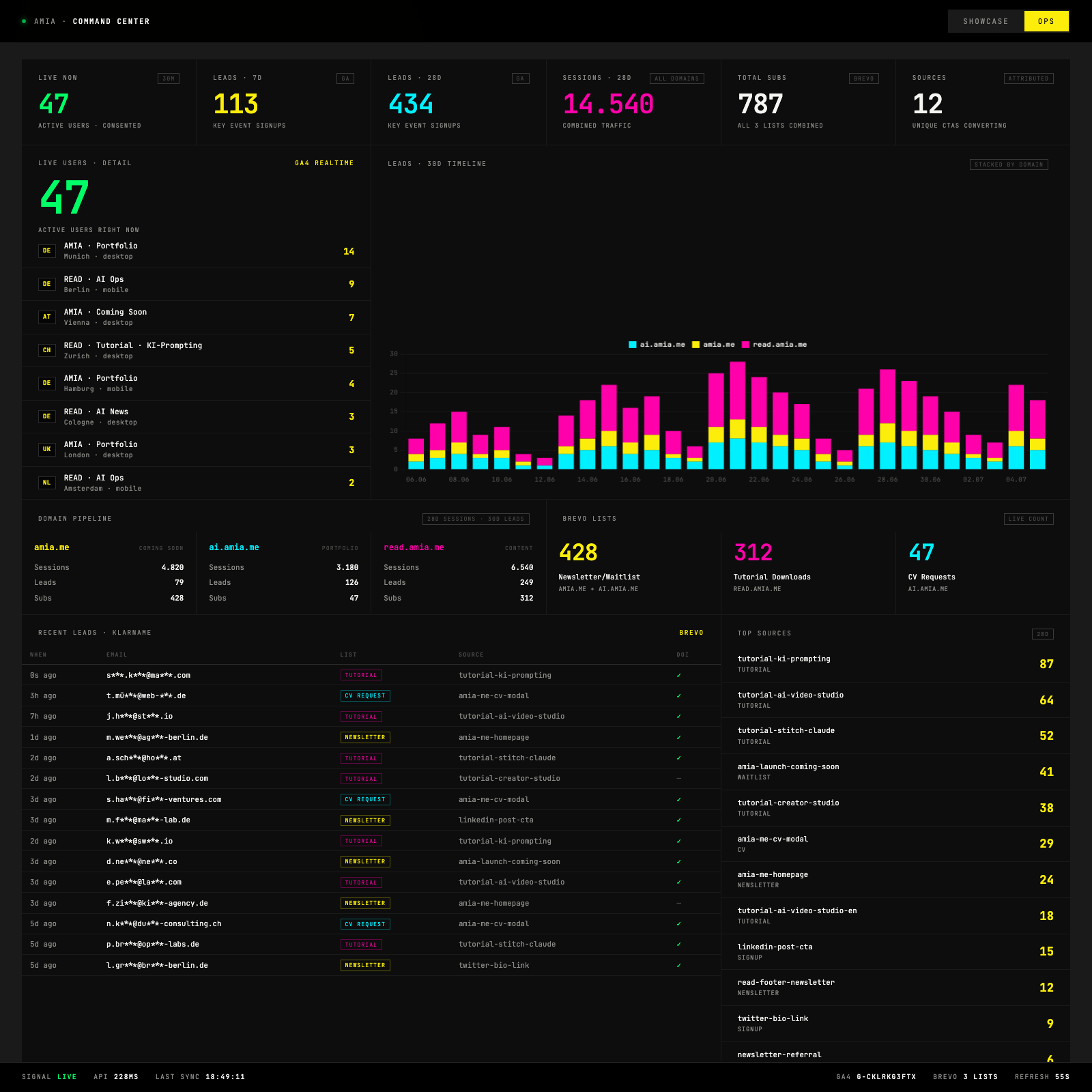
A command centre isn't "yet another dashboard". It's an orchestration layer that sits on top of your existing tools and delivers three things:
1. A single source of truth. When marketing says "we had 340 MQLs," when sales says "we had 12 deals," when finance says "we spent €480k" — those numbers come out of one aggregated source, not out of three tools with three time zones, three definitions and three cache states.
2. Role-based views on the same data layer. Sales sees a pipeline view with campaign context per deal. Marketing sees a campaign view with deal feedback per campaign. Finance sees blended CAC, LTV per cohort, ROAS trends. One backend, three interfaces. Not three separate systems that sync at night.
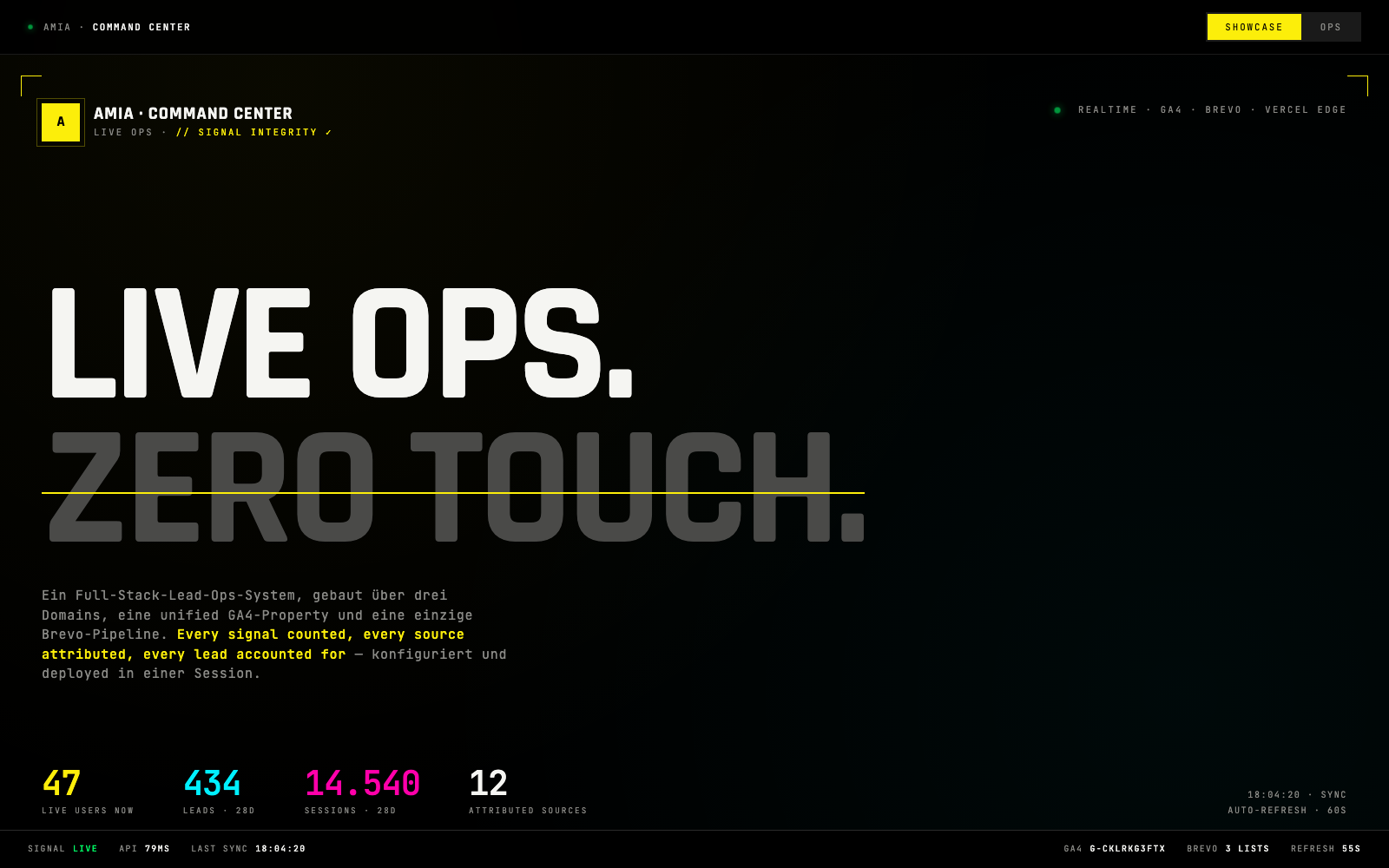
3. Attribution that survives the MQL-to-SQL handoff. The most common attribution gap: marketing tracks up to form submit. Sales tracks from discovery call onwards. In between, campaign context is lost. A command centre makes sure that campaign ID, UTM context and first-touch signal persist all the way into the CRM deal object — and stay visible in the sales interface.
That's the difference. A dashboard answers "how many?". A command centre answers "why?" — and delivers the answer in the interface where the role already works.
Who needs this #
This discussion is relevant to:
- CROs, VPs of Enablement, RevOps leads — accountable for making sales and marketing metrics agree
- MarTech / Marketing Operations leads — who have to orchestrate the stack without waiting 18 months for a warehouse project
- CFOs — who need to quantify marketing return but only get "it feels right" answers
- Companies with €100k+/month ad spend — where an attribution error of ±10% translates to €10k–€100k/month of misallocated budget
- Multi-brand or multi-region setups — where each brand runs its own reporting layer in parallel and consolidation hurts
Not relevant for setups with one domain, one vendor and one reporting need. The overhead only pays back at real multi-touch complexity.
If you recognise yourself in one of the first five bullets: what follows is the technical reference architecture.
Full blueprint · free with email
Six phases with full reference code, enterprise deployment patterns and Salesforce integration. Plus the complete architecture document (PDF) lands in your inbox within minutes.
Phase 1: The Unified Data Layer — semantics, not tools #
The most common wrong turn in enablement setups is the wrong segmentation. Teams think in tools ("HubSpot list", "Salesforce campaign", "GA4 audience") — and replicate the silos they were meant to dissolve.
The right layer of thinking is the lifecycle stage, not the tool. Every contact in your system has a current stage in their lifecycle, and this stage is defined across tools.
Canonical lifecycle model
- Anonymous — first-party signal without identity (session, page view, cookie)
- Subscriber — consent given but no buying-intent signal (newsletter opt-in, content download)
- Lead — specific buying-intent signal (demo request, pricing-page visit, contact form)
- MQL (Marketing Qualified) — marketing has qualified the lead against the score threshold
- SQL (Sales Accepted) — sales has accepted the lead, ownership transferred
- Opportunity — open deal stage, forecast-relevant
- Customer — deal closed, active relationship
Each of these stages has a single definition, documented in a stages.yaml (or a Notion page, whatever — the point is: one source). And every tool in the stack respects that definition:
- GA4 custom dimension
lifecycle_stage - HubSpot/Marketo property
lifecycle_stage - Salesforce contact field
Lifecycle_Stage__c
If those three values diverge for the same contact, treat it as an enablement incident, not a reporting detail. Handle divergences like production outages: root-cause analysis, fix at the source, no manual patches.
SOURCE attribution on every contact
Alongside the lifecycle stage, every contact carries a source string that identifies the original conversion CTA (campaign_q3_webinar_series, whitepaper_analytics_maturity, linkedin_ads_cxo_retargeting). This string survives tool boundaries.
# Example: create a contact in the ESP layer with full context
curl -sS -X POST \
  -H "api-key: $ESP_API_KEY" \
  -H "content-type: application/json" \
  -d '{
    "email": "j.mueller@example.com",
    "attributes": {
      "SOURCE": "campaign_q3_webinar_series",
      "CAMPAIGN_ID": "camp_20260615_webinar_analytics",
      "LIFECYCLE_STAGE": "Subscriber",
      "FIRST_TOUCH_UTM_SOURCE": "linkedin",
      "FIRST_TOUCH_UTM_MEDIUM": "paid_social"
    },
    "listIds": [12],
    "updateEnabled": true
  }' \
  https://api.esp-vendor.com/v3/contacts
Two attribute fields — SOURCE and CAMPAIGN_ID — that must resurface in every downstream system. When a Salesforce AE opens a deal, these fields are visible on the contact/lead. When marketing builds retargeting audiences, they filter by CAMPAIGN_ID.
Phase 2: The Universal Ingest pipeline #
The second core building block: one technical endpoint for every lead-capture event across every domain, landing page and channel. No form posts directly to HubSpot or the ESP — everyone posts to a Universal Ingest that routes centrally.
In distributed setups, every landing page posts to its own ESP endpoint. Result: custom fields get set inconsistently, attribution context is lost (ESP forms silently discard custom attributes if they aren't mapped), and every data-model change requires touching N forms. A single ingest fixes that.
Reference implementation (Vercel/Node.js Serverless, also deployable as AWS Lambda or Cloudflare Worker):
// api/ingest.js — universal lead capture endpoint
const FORM_TO_ROUTING = {
  webinar_registration:  { list_id: 12, lifecycle: 'Subscriber' },
  content_download:      { list_id: 15, lifecycle: 'Subscriber' },
  demo_request:          { list_id: 22, lifecycle: 'Lead' },
  pricing_inquiry:       { list_id: 25, lifecycle: 'Lead' },
  enterprise_contact:    { list_id: 28, lifecycle: 'MQL' },  // pre-qualified
};

export default async function handler(req, res) {
  // ... auth, CORS, validation ...

  const {
    email, form, campaign_id, source,
    utm_source, utm_medium, utm_campaign,
    first_name, last_name, company_domain, honeypot,
  } = req.body;

  if (honeypot) return res.status(200).json({ ok: true });

  const routing = FORM_TO_ROUTING[form];
  if (!routing) return res.status(400).json({ ok: false, error: 'invalid_form' });

  // 1. Write to ESP with full attribution context
  await fetch('https://api.esp-vendor.com/v3/contacts', {
    method: 'POST',
    headers: { 'api-key': process.env.ESP_API_KEY, 'content-type': 'application/json' },
    body: JSON.stringify({
      email: email.trim().toLowerCase(),
      attributes: {
        SOURCE: source,
        CAMPAIGN_ID: campaign_id,
        LIFECYCLE_STAGE: routing.lifecycle,
        FIRST_TOUCH_UTM_SOURCE: utm_source,
        FIRST_TOUCH_UTM_MEDIUM: utm_medium,
        FIRST_TOUCH_UTM_CAMPAIGN: utm_campaign,
        COMPANY_DOMAIN: company_domain,
      },
      listIds: [routing.list_id],
      updateEnabled: true,
    }),
  });

  // 2. Fire GA4 conversion event (server-side, survives ad blockers)
  await fetch(`https://www.google-analytics.com/mp/collect?measurement_id=${GA_ID}&api_secret=${GA_SECRET}`, {
    method: 'POST',
    body: JSON.stringify({
      client_id: req.body.client_id,
      events: [{ name: routing.lifecycle === 'Lead' ? 'lead_generated' : 'signup', params: {
        source, campaign_id, lifecycle_stage: routing.lifecycle,
      }}],
    }),
  });

  // 3. Push to CRM if pre-qualified
  if (routing.lifecycle === 'MQL') {
    await createSalesforceLead({ email, first_name, last_name, company_domain, source, campaign_id });
  }

  return res.status(200).json({ ok: true });
}
Three parallel signal streams from one endpoint: ESP for nurturing, GA4 for analytics attribution, CRM for sales handoff. All consistent, all carrying the same SOURCE + CAMPAIGN_ID.
That's the most important move: one endpoint, three layer sinks, consistent semantics.
Phase 3: Analytics-as-Code #
In enterprise setups, GA4 typically gets configured through the UI: an analytics engineer clicks custom dimensions, key events and data streams together. Result: no versioning, no reproducibility across regions/brands, and property migrations lose the config state.
The enterprise move: GA4 configuration via the Admin API, in version control, as part of the deployment process. New regional property? One script run, not a 3-day UI setup.
# ga4-config-apply.sh — reproducible property configuration
TOKEN=$(python3 ga_token.py)
PROP=$1  # numeric property ID

# 1. Data retention → 14 months (default is 2)
curl -sS -X PATCH \
  -H "Authorization: Bearer $TOKEN" \
  -H "content-type: application/json" \
  -d '{"eventDataRetention":"FOURTEEN_MONTHS","resetUserDataOnNewActivity":true}' \
  "https://analyticsadmin.googleapis.com/v1beta/properties/$PROP/dataRetentionSettings?updateMask=eventDataRetention,resetUserDataOnNewActivity"

# 2. Custom dimensions — the enablement taxonomy
for DIM in source campaign_id lifecycle_stage first_touch_utm_source first_touch_utm_medium first_touch_utm_campaign company_domain; do
  curl -sS -X POST \
    -H "Authorization: Bearer $TOKEN" \
    -H "content-type: application/json" \
    -d "{\"parameterName\":\"$DIM\",\"displayName\":\"$DIM\",\"scope\":\"EVENT\"}" \
    "https://analyticsadmin.googleapis.com/v1beta/properties/$PROP/customDimensions"
done

# 3. Key events — the enablement conversion set
for EV in signup lead_generated demo_requested mql_qualified sql_accepted opportunity_created deal_won; do
  curl -sS -X POST \
    -H "Authorization: Bearer $TOKEN" \
    -H "content-type: application/json" \
    -d "{\"eventName\":\"$EV\",\"countingMethod\":\"ONCE_PER_EVENT\"}" \
    "https://analyticsadmin.googleapis.com/v1beta/properties/$PROP/keyEvents"
done
Note: the key events cover the whole lifecycle, not only marketing conversions. sql_accepted, opportunity_created, deal_won get fired back into GA4 from the sales system (via Measurement Protocol), so marketing attribution stays visible in GA4 all the way to the closed deal.
This is the real enablement move: GA4 stops being just a marketing tool and starts being a cross-layer attribution backbone. Sales events flow back, attribution closes.
Phase 4: The Cross-Team Attribution layer #
After Phase 3 you have the technical data layer. Phase 4 is the process work — and it's often the hardest part.
The MQL → SQL handoff contract. Sales and marketing must agree on:
- Definition of an MQL (score threshold, ICP fit, behaviour signal). Documented, versioned, quarterly reviewed.
- SLA for the sales action (max. 24h between MQL trigger and sales outreach).
- Rejection process (sales rejects an MQL → back to marketing with a reason:
wrong_persona,no_budget_signal,outside_icp). The reason is a structured field, not a free-text note.
The rejection reason closes the attribution loop: marketing sees not just "how many MQLs?" but "which campaign produces MQLs with a high sales-acceptance rate?" Sales sees "which SOURCE tag correlates with successful discovery calls?"
Technically: a Salesforce trigger on lead status change fires an event back to the Command Center backend:
// Salesforce Apex trigger (simplified)
trigger LeadHandoffTrigger on Lead (after update) {
  for (Lead l : Trigger.new) {
    Lead old = Trigger.oldMap.get(l.Id);
    if (l.Status != old.Status) {
      HttpRequest req = new HttpRequest();
      req.setEndpoint('https://command-center.company.com/api/salesforce-webhook');
      req.setMethod('POST');
      req.setBody(JSON.serialize(new Map<String, Object>{
        'lead_id' => l.Id,
        'email' => l.Email,
        'status_old' => old.Status,
        'status_new' => l.Status,
        'rejection_reason' => l.Rejection_Reason__c,
        'campaign_id' => l.Original_Campaign_ID__c,
        'source' => l.SOURCE__c
      }));
      Http h = new Http(); h.send(req);
    }
  }
}
These webhook events get aggregated in the Command Center backend and mixed into the marketing views.
Phase 5: The Orchestration backend #
The backend is the core of the Command Center. A serverless function (or a container deployment, depending on enterprise standard) that reads in parallel from all three layers, aggregates, and returns a canonical JSON response.
Core tasks:
- GA4 Data API (analytics layer) — sessions, events, attribution paths
- ESP / marketing automation API (campaign layer) — contacts, list membership, campaign performance
- CRM API (sales layer) — deals, stages, pipeline value, deal-to-lead mapping
- Cross-system attribution join — match contacts across the three systems (email as primary key, company domain as backup)
Example response structure — the canonical data layer shared across all three persona views:
{
  "as_of": "2026-07-06T09:00:00Z",
  "kpis": {
    "leads_28d": 340,
    "mqls_28d": 127,
    "sqls_28d": 82,
    "opportunities_open": 23,
    "pipeline_value_open_eur": 4820000,
    "won_deals_qtd": 12,
    "won_value_qtd_eur": 2140000,
    "blended_cac_eur": 12300,
    "roas_qtd": 4.6
  },
  "attribution": {
    "won_deals_by_source": [
      { "source": "campaign_q3_webinar_series",    "deals": 4, "value_eur": 890000 },
      { "source": "linkedin_ads_cxo_retargeting",  "deals": 3, "value_eur": 620000 },
      { "source": "content_analytics_maturity",    "deals": 2, "value_eur": 340000 }
    ]
  },
  "handoff_health": {
    "mql_to_sql_conversion_rate": 0.645,
    "mql_avg_time_to_sales_action_hours": 8.3,
    "sql_rejection_reasons": {
      "wrong_persona": 12,
      "no_budget_signal": 8,
      "outside_icp": 5
    }
  }
}
Sales, marketing and finance render different widgets over the same response — but they see the same numbers.
Phase 6: Multi-Persona Dashboards #
The last layer is the front-end orchestration. Three views, one backend.
Sales view (for AEs and SDR managers):
- Pipeline overview with campaign context per deal
- MQL feed with SOURCE + first-touch context
- Deal attribution: "which campaign triggered which open deal"
- Personal pipeline panel for the individual AE
Marketing view (for demand-gen and campaign owners):
- Campaign performance with deal feedback (MQL→SQL conversion per campaign, not just MQL count)
- Top sources ranked by deal value, not by lead volume
- Rejection reasons as a structured feedback loop
- ROAS per campaign with sales attribution
Exec view (for CFO, CRO, VP Enablement):
- Blended CAC, LTV per cohort, payback period
- Pipeline coverage ratio (pipeline / quota target)
- Marketing-sourced revenue share
- Trend deltas vs. previous quarter
Technically trivial if the backend is built right: same JSON, three HTML layouts, three URL routes (/sales, /marketing, /exec). Auth via SSO against the corporate IdP. Auto-refresh every 60s.
The value isn't in fancier charts — it's in the consistency of the numbers across the three roles. When marketing says "we had 340 MQLs" and sales says "I see 340 MQLs in the Command Center", an attribution argument is over before it starts.
Where internal teams usually fail #
Why don't most enterprises build this themselves? Three recurring patterns from our discovery calls:
It gets kicked off as a data warehouse project, not as an enablement project. Result: 18 months of warehouse build, no sales-rep adoption, a dashboard only RevOps opens. The command centre principle is the reverse: enablement front-end first, data layer follows the UI requirement.
The handoff contract gets implemented before sales-marketing alignment. Without clean MQL/SQL definitions and a shared rejection-reason set, no technical system solves the attribution problem. It's 40% process work, 60% tech.
All three layers get rebuilt from scratch instead of orchestrated. Enterprises want to "replace it all at once" and end up in RFPs for Salesforce migration + a new MAP + a new BI suite. The pragmatic path: existing tools stay, an orchestration layer sits on top. 4–6 weeks to go-live, not 18 months.
An embedded team (2–3 experts) sits with you for 4–6 weeks. Week 1: handoff-contract workshop with sales, marketing, RevOps. Week 2–3: Unified Data Layer + Universal Ingest. Week 3–4: backend + multi-persona front-ends. Week 5–6: rollout, adoption, enablement sessions. After: you own the code, we hand over the operations documentation.
Next steps #
If you recognise sales-marketing alignment as a structural problem in your organisation — not a reporting detail — these are the three ways forward:
1. Discovery workshop (2 hours, free). We walk through your current stack, identify the three biggest attribution gaps and quantify the blind spot in your marketing return. Not a sales pitch, concrete analysis. Request a slot →
2. Reference architecture. The full technical blueprint (Universal Ingest, Analytics-as-Code, attribution layer, multi-persona front-end) with Terraform/CDK modules, GA4 config scripts and Salesforce trigger reference. Delivered to your inbox after this signup.
3. Embedded engagement. 4–6 weeks of embedded team. Fixed price, defined scope, transparent weekly deliverables. Request scope →
If you're not sure which route is right: start with the discovery workshop. We'll tell you honestly whether your problem is big enough to justify a 6-week investment — or whether a smaller intervention will do.